Medical Visualization Reimagined: Introducing DICOM Vision 2
A professional DICOM viewer that combines speed, precision, and a refreshingly simple pricing model.
In the fast-paced world of medical imaging, the software you use shouldn't be a bottleneck. For radiologists, surgeons, medical students, and researchers, the ability to visualize anatomical data instantly and accurately is not just a convenience, it’s a necessity. Yet, for too long, the market has been dominated by two extremes: clunky, dated free viewers that lack essential features, or expensive, subscription-based enterprise suites that feel like overkill for a personal workstation.
Today, we are thrilled to announce the launch of DICOM Vision 2, a next-generation application designed to bridge that gap. Available now for both macOS and Windows, DICOM Vision 2 brings professional-grade 2D and 3D visualization to your desktop with a focus on speed, usability, and most importantly, respect for your wallet.
Say goodbye to recurring monthly fees. Say hello to the future of medical visualization.
The "Vision" Behind the Speed
When we set out to build DICOM Vision 2, our core philosophy was "Medical Visualization Made Simple." But simple doesn't mean basic. It means removing the friction between you and your data.
From the moment you launch the app, you’ll notice the difference. Built to leverage the latest hardware, including robust optimization for Apple’s M-series silicon, DICOM Vision 2 handles complex datasets with ease. Whether you are loading a massive multi-slice CT scan or a high-resolution MRI series, the application remains fluid and responsive. There is no waiting for servers to render your images; everything happens locally on your machine, ensuring your patient data remains private and your workflow remains uninterrupted.
A Deep Dive: The 3 Pillars of Visualization
DICOM Vision 2 organizes its powerful toolset into three intuitive tabs, ensuring you have the right tools for the specific task at hand.
1. The Image Slice (2D)
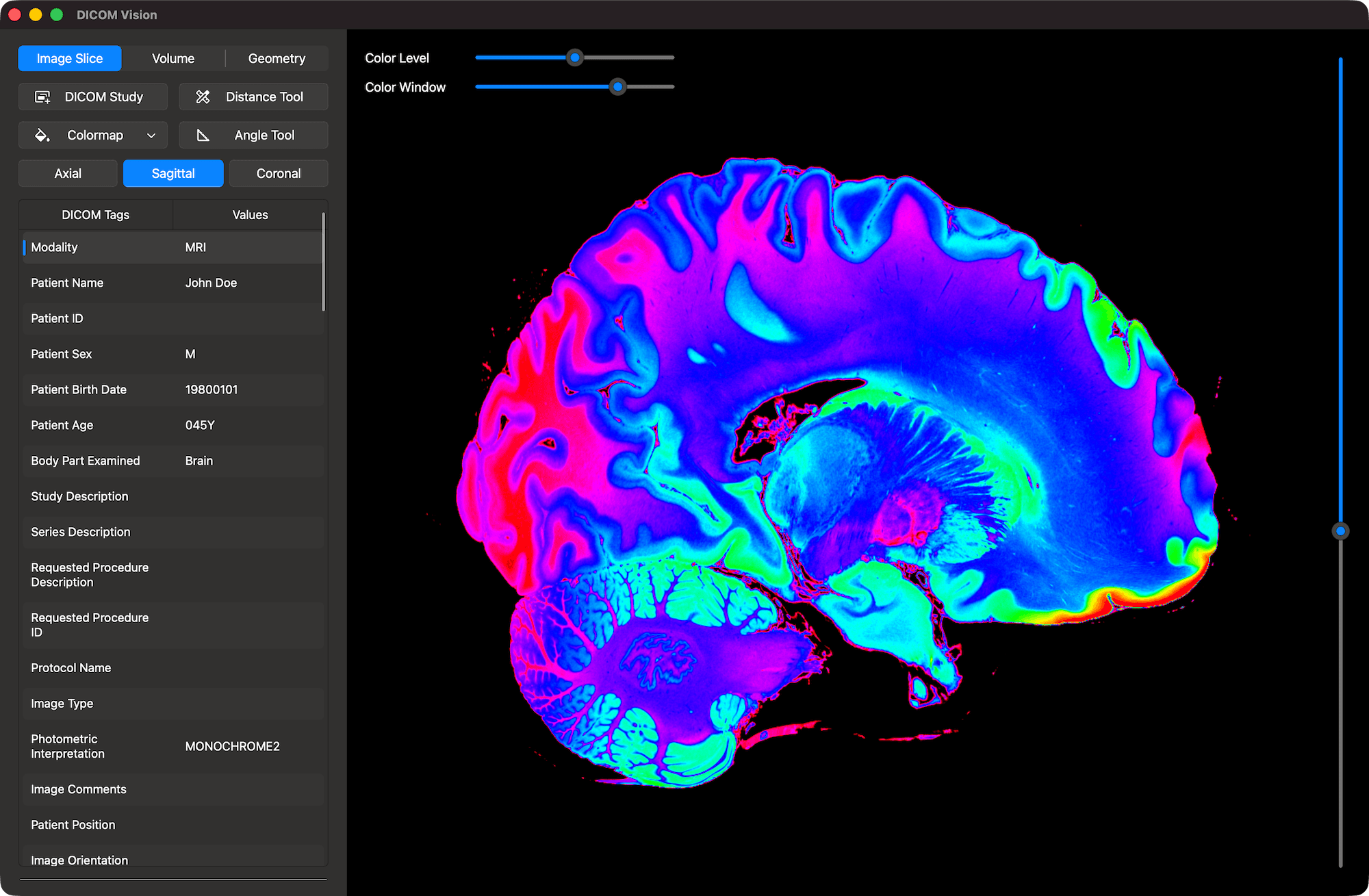
The foundation of any DICOM viewer is its 2D performance. We have refined the Image Slice tab to be the ultimate diagnostic workspace.
- Total Control: Instantly switch between Axial, Sagittal, and Coronal orientations. Scroll through slices with silky-smooth responsiveness.
- Enhanced Clarity: Apply scientific or DICOM standard colormaps to highlight tissue density variations that grayscale might miss.
- Precision Tools: Need to measure a tumor or check the angle of a fracture? Our Distance and Angle measurement tools calculate values in real-time, allowing for quick, accurate analysis.
- Contrast Mastery: The Color Level and Color Window controls give you granular command over brightness and contrast, ensuring you can visualize the finest details in soft tissue or bone.
2. The Volume View
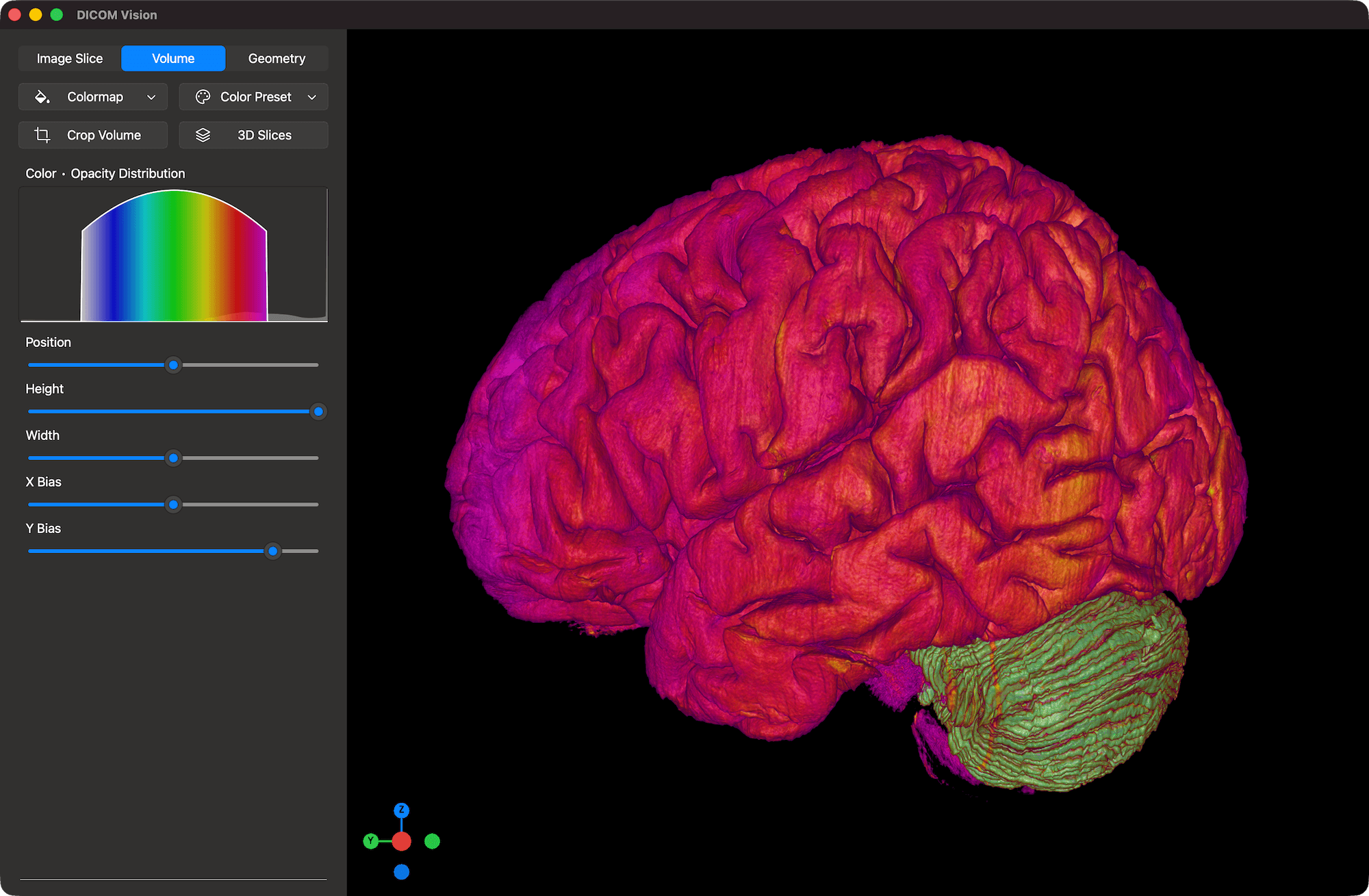
Two-dimensional slices tell only part of the story. The Volume tab brings your data to life with stunning 3D volumetric rendering. This isn't just for show, it is a critical tool for understanding spatial relationships within the body.
- Volumetric Colormaps: Apply pre-defined color presets to differentiate between muscle, bone, and vasculature instantly.
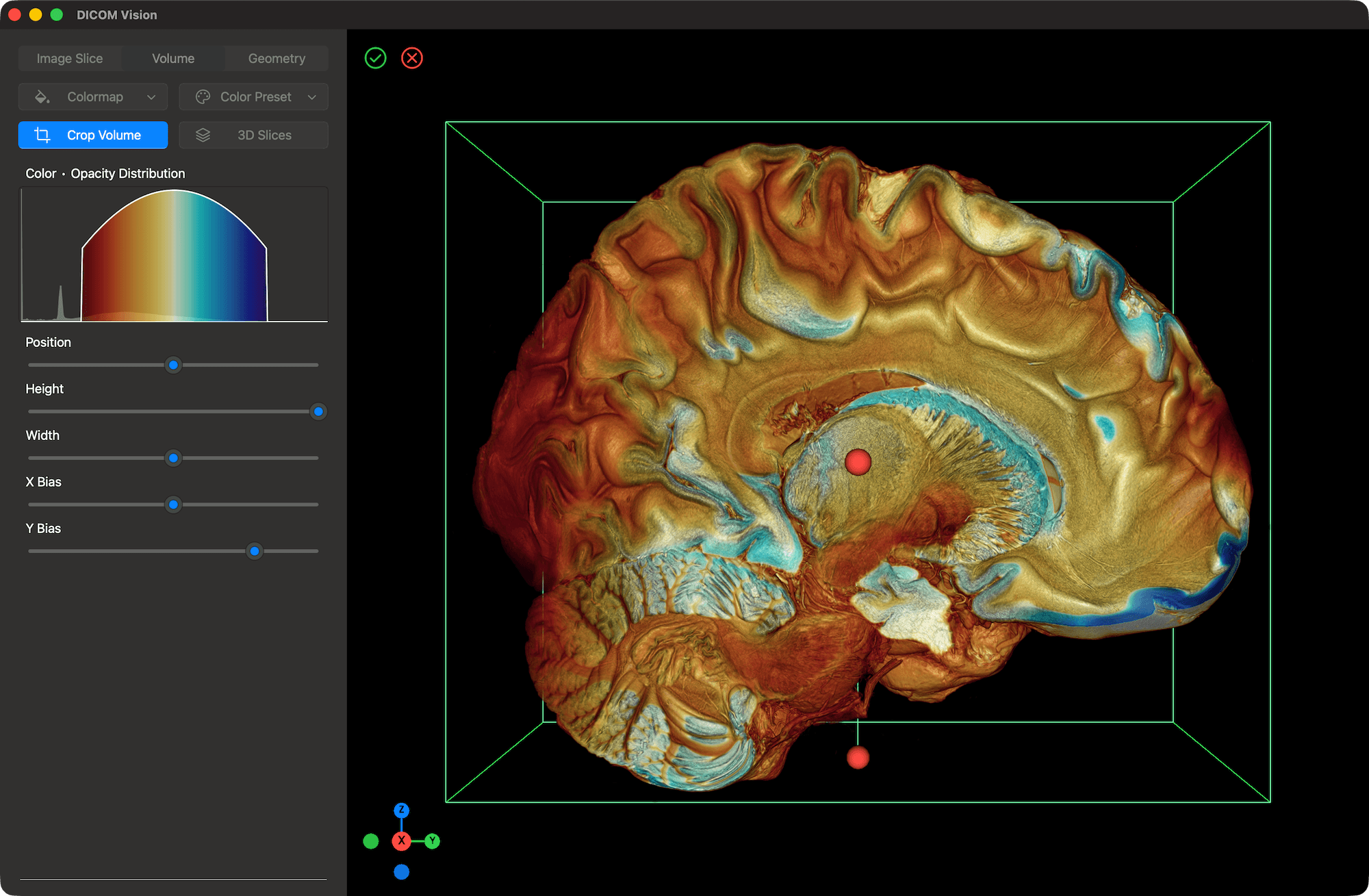
- The Crop Tool: Peer inside. Our intuitive Crop Tool allows you to slice away outer layers of the 3D volume to reveal internal structures, offering a "virtual dissection" experience.
- 3D Slicing: Uniquely, you can add Axial, Sagittal, and Coronal slices into the 3D view, giving you a hybrid perspective that anchors your 3D visualization with 2D precision.
3. The Geometry View
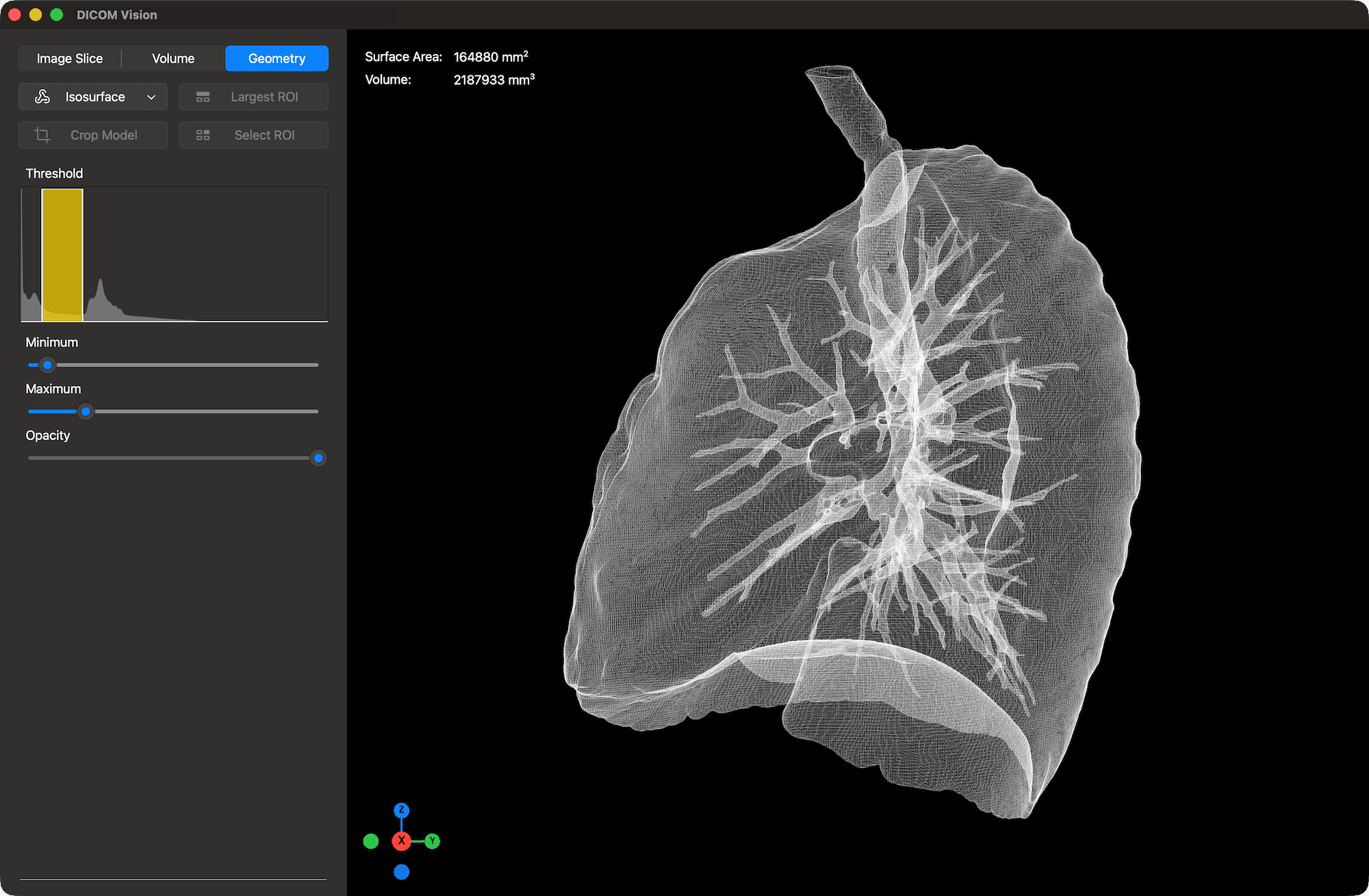
For those who need to take their data out of the screen and into the real world, the Geometry tab is a game-changer.
- Create Isosurfaces: Using advanced mesh generation algorithms, you can create lightweight, interactive 3D surfaces of specific anatomy. Define a threshold and watch as the software builds a model of the skull, spine, or organ.
- Refine and Export: Smooth the surface, fill holes, and view the internal topology in Wireframe mode. Once your model is perfect, you can export it in STL format.
- Real-World Application: This feature is invaluable for 3D printing models for surgical planning, patient education, or creating physical training aids for students.
The Elephant in the Room: No Subscriptions
Perhaps the most exciting feature of DICOM Vision 2 isn't a visualization tool at all, it’s the business model.
We believe that once you buy a tool, you should own it. The trend of forcing professionals into "forever subscriptions" just to view their own medical data ends here. DICOM Vision 2 offers one-time purchase options.
- Try Before You Commit: We are confident you will love the workflow, which is why we offer a 7-Day Free Trial. Download it, load your toughest cases, and see the speed for yourself.
- Standard & Pro Options: Depending on your needs, you can choose a tier that works for you. Whether you need the essential 2D tools of the Standard edition or the full 3D and export capabilities of the Pro edition, you pay once. No monthly bills. No hidden fees. Just professional software that belongs to you.
Seamless Cross-Platform Experience
One of the biggest hurdles in medical imaging software has always been platform fragmentation. DICOM Vision 2 shatters that barrier with native apps optimized for both macOS and Windows.
- For Mac Users: Designed for macOS 15.4 and later, the app is optimized for Apple Silicon (M1 chips and later). It feels right at home on your Mac.
- For Windows Users: Fully compatible with Windows 11, providing a robust, native experience that integrates seamlessly with your workstation.
Keep an eye out for a native Linux version in the near future.
Ready to Experience the Difference?
Whether you are a radiologist looking for a reliable home workstation viewer, a surgeon planning a complex procedure, or a student learning anatomy, DICOM Vision 2 is the tool you’ve been waiting for.
A complete user guide can be found here.